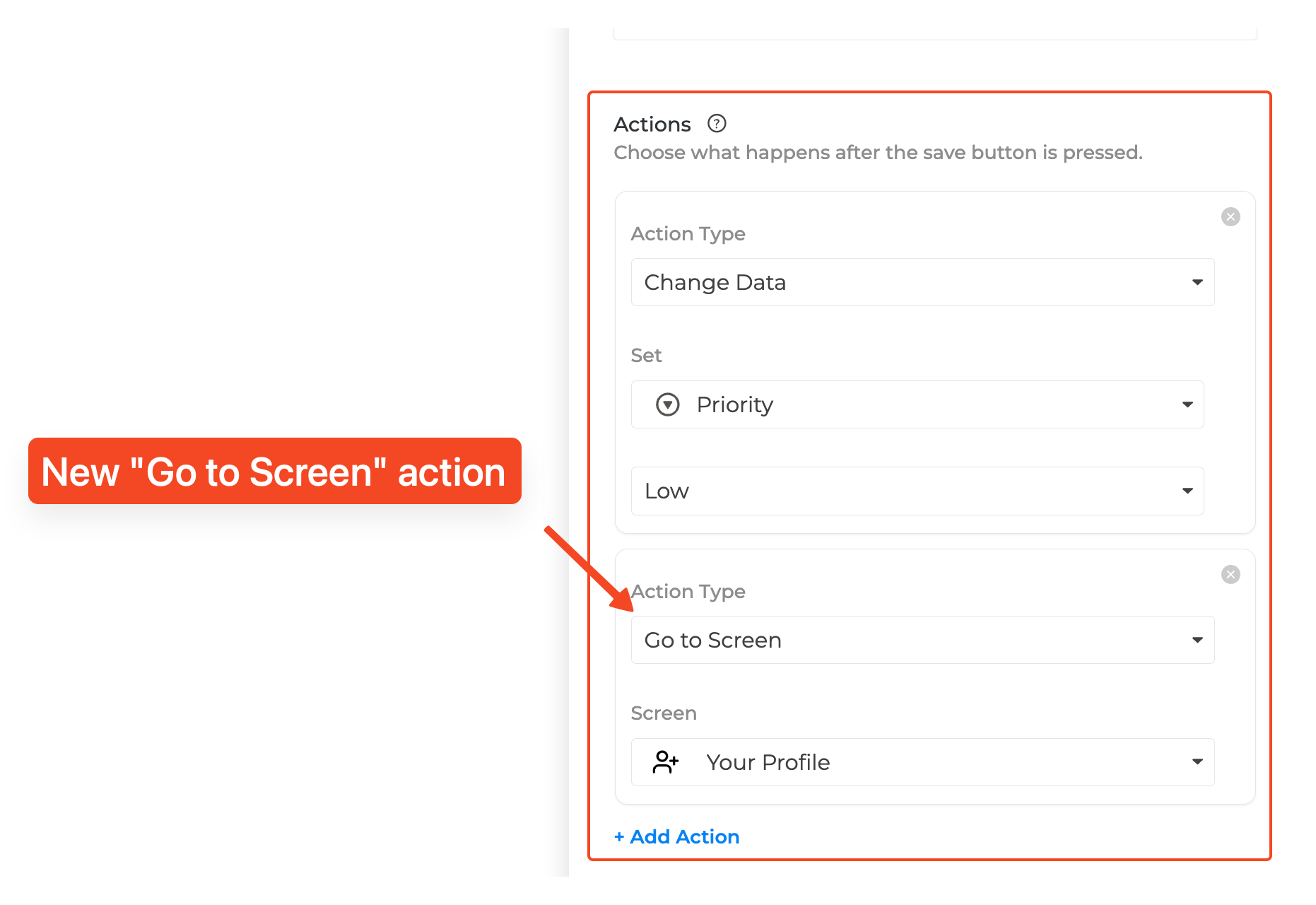
Screen Actions already let you auto-update data when a form is submitted. Today, they’re getting a boost with two new navigation actions that put you in control of where users go next.
———
What’s new
-
Go to Screen – send makers or end users directly to another screen in the same app after submit. Perfect for multi-step flows, success pages, or follow-up forms.
-
Open Link – redirect to any external URL (think payment confirmations, docs, surveys) the moment the form finishes.
You can combine as many existing Change Data steps as you like with one navigation action (either Go to Screen or Open Link). Actions still execute top to bottom - reorder them to match your flow.
———
How to get started
-
Open a form screen in the builder.
-
In the Actions panel, click Add action.
-
Choose Go to Screen or Open Link, then pick the destination screen or paste your link.
-
Use the drag handle to reorder, and tap the × to remove an action when needed.
———
Why you’ll love it
-
Guide users seamlessly through multi-stage experiences.
-
Deliver instant feedback with dedicated confirmation screens or external resources.
-
Keep forms smart by pairing Change Data updates with navigation—no extra automation required.
Give the new navigation options a spin and let us know what journeys you create!