This allows you to add a Comments Component to your app screens, this way you add a social element to your app by enabling your app users to comment on different Screens.
Hi @sameer_notionapps, the ability to communicate with other users within the app would be a game changer for me and my organisation. Is there the ability to get notifications within the app and are you looking at including guest users at some point?
1 Like
Welcome to the community @Foodshare! Comments are a feature we plan to build in the future. The feature would largely look like a simple comments section below every page.
As for guest users, we do not have a plan to introduce them just yet. However, we are building a sign up feature through which users can sign up without them being added to the users database beforehand.
1 Like
Thanks for replying Jatin, these features sound promising and I look forward to seeing them rolled out in the future.
2 Likes
What’s new in this area?
Hello @jatin_notionapps and @sameer_notionapps, this features is really great and is really useful in almost all use-case.
Is this relative to page comment section in Notion, or is this another way around?
Because I would like to ask and add this in our roadmap to show the Page Comment in our app. Hopefully this is possible in our applications.
Ref: Comment
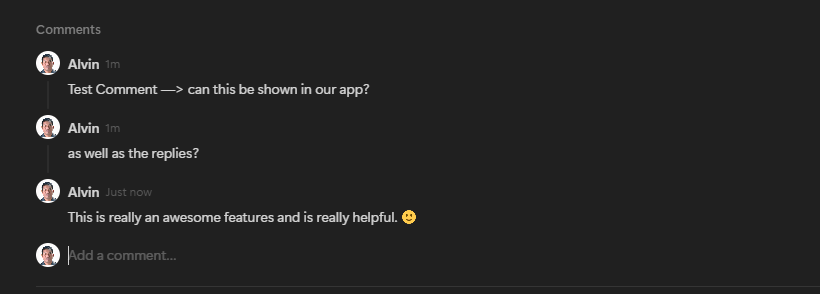
Thank you so much!
1 Like
In the coming months, we will add this as a component just like “Show Page Content”.
2 Likes
Awesome! That’s a great news @jatin_notionapps
1 Like
I am evaluating NotionApps on a trial basis now, with comments being a core requirement. Is this on the roadmap for release? What’s the ETA?
1 Like
Welcome to the NotionApps family Mathew.
Hi, this is something that I can take out of the backlog and put in-progress. I’ll work up a requirements document and try to schedule it for the next release 28 Jun 26.
Brief requirement:
Application builders need a configurable Comments component that can be added to one or more screens in a published application. End users of the published application can submit comments on the screen, reply to existing comments, and view approved comments. Comments and replies must not be publicly visible until approved by the application owner or another authorized moderator.
The builder and owner must be able to moderate submitted content, edit content when appropriate, approve or disapprove comments and replies, schedule when approved comments appear and disappear, keep approved comments visible indefinitely, and pin up to 3 comments at the top of the thread for a screen.
1 Like
This is now live!! You should see it available in your UI. The help guide can be found here: Comments | Product Docs